TOPODRONE 24 (ZV-E10)
- Disclaimer
- Product parameters
- TOPODRONE P24 Specification
- TOPODRONE UAV PPK Upgrade Kit Specifications
- Wi-Fi connection and setting adjusting
- Main Tab
- Settings Tab
- Tab HW
- Image Settings for TOPODRONE P24
Disclaimer
Designations
Warning
It's important
Tips and advice
Background information
Warning
TOPODRONE P24 is a photogrammetric camera designed for surveying of terrain objects with subsequent processing of materials in any photogrammetric software. TOPODRONE UAV PPK UPGRADE KIT geodetic receiver, working together with the camera, allows you to get high-precision coordinates of photocenters, synchronizing both devices by cable. The GNSS receiver records “raw” measurements in *.UBX format and shutter timestamps.
DO NOT store the TOPODRONE P24 in direct sunlight, in places with poor ventilation or near a heat source.
DO NOT expose the lens of the TOPODRONE P24 to direct sunlight.
DO NOT turn the TOPODRONE P24 on or off for short periods of time. Wait at least 30 seconds before turning the device on or off.
DO NOT use TOPODRONE P24 in humid and dusty environment, it has no IPXX protection, so using the equipment may result in malfunction.
DO NOT insert or remove the memory card while the camera is in use.
DO NOT touch the lens surface with your hands or any sharp objects, otherwise you may scratch the surface of the lens, which will affect the quality of the images.
DO NOT detach the lens while the camera is in use.
DO NOT remove the Micro-SD card while the camera is in use.
When the TOPODRONE P24 camera is not in use, store it in the protective case in which it is shipped. It is recommended that you store the equipment in an environment with a relative humidity of 40% or less and a temperature of 20±5°C.
Product parameters
Photogrammetric camera TOPODRONE P24 is equipped with APS-C format sensor with global mechanical shutter and possibility to change lenses. This camera can be mounted on a 3-axis gimbal or together with one of the TOPODRONE laser scanners (depending on the delivery set).
Supply package
1. Photogrammetric TOPODRONE P24 camera – 1 pc.
2. Sony 16 mm SEL16F28 Lens – 1 pc.
3. TOPODRONE PPK UAV GNSS Receiver – 1 pc.
4. GNSS external helix antenna – 1 pc.
5. MicroSD card 16 GB for TOPODRONE PPK UAV GNSS Receiver – 1 pc.
6. MicroSD card 32 GB Photogrammetric TOPODRONE P24 – 1 pc.
7. USB Type-C to SHLD cable – 1 pc.
8. SHLD – SHLD connection cable – 1 pc.
9. * GNSS antenna cable – 1 pc.
10. * 3-Axis Gimbal DJI X-Port – 1 pc.
11. * Protective transport case with spoon (depending on delivery) – 1 pc.
12. * L-shaped platform with screws for attaching to TOPODRONE LiDAR – 1 pc.
13. * Skyport-SHLD adapter (when installed together with TOPODRONE LiDAR) – 1 pc.
* optionally available
TOPODRONE P24 Scheme
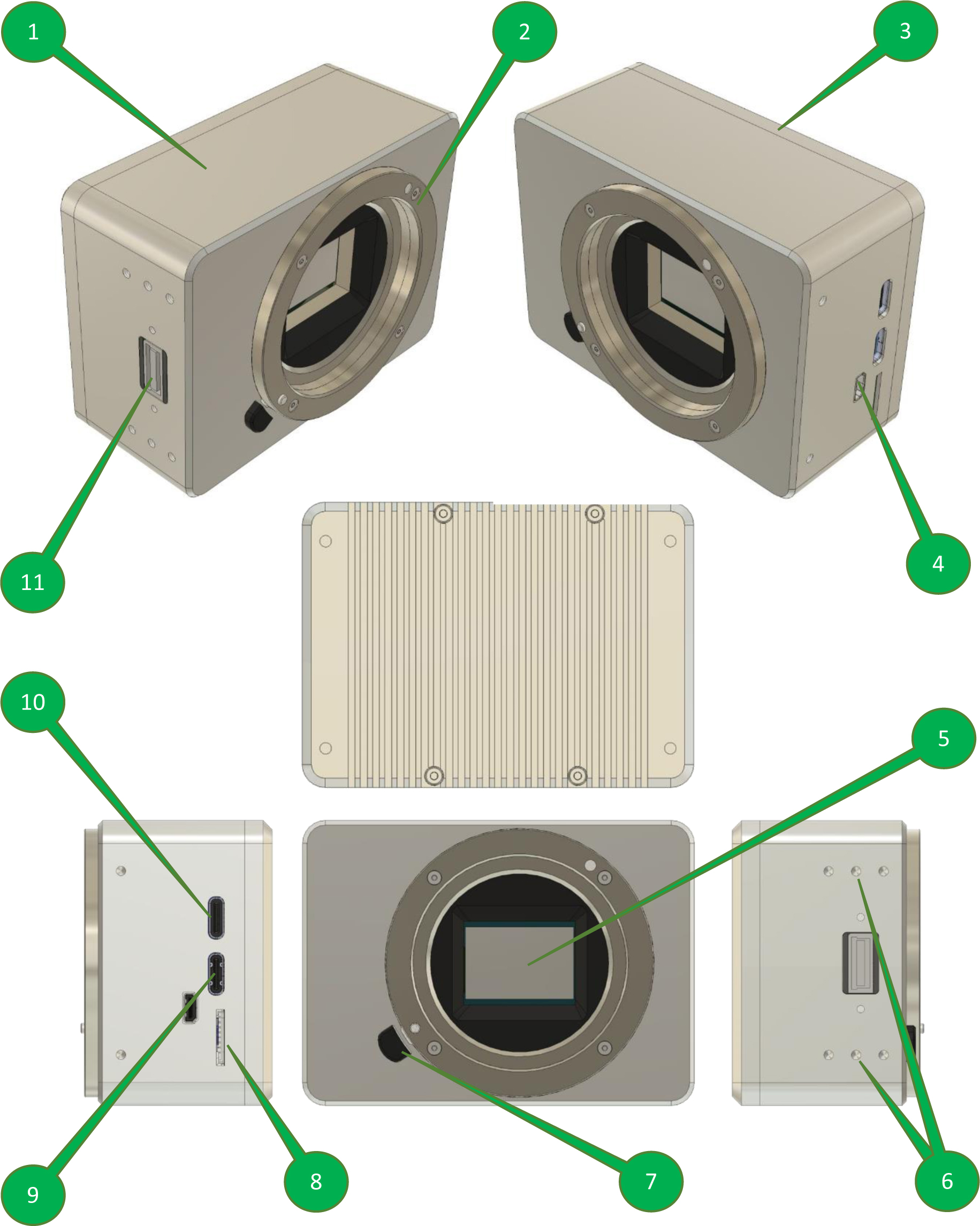
| 1. | Main body | 7. | Bayonet lens release button |
| 2. | Sony E Type bayonet | 8. | Micro-SD card port |
| 3. | Back cover | 9. | USB Type-C 1 (mobile device connection) |
| 4. | Micro-HDMI port | 10. | USB Type-C 2 (external power connection) |
| 5. | APS-C sensor | 11. | SHLD port for UAV connection |
| 6. | Side M3 threaded holes |
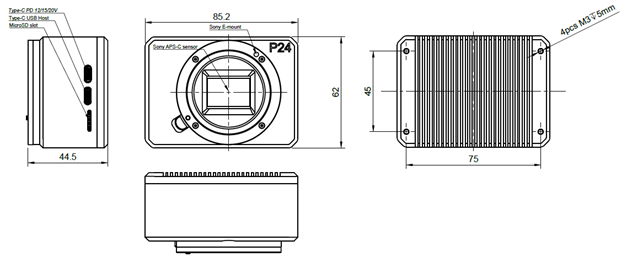
TOPODRONE P24 dimensions drawing
Supported aircraft
The TOPODRONE P24 photogrammetric camera can be used on almost any unmanned aerial vehicle, it is recommended to consult the manufacturer of the equipment.
Full control and live video streaming to the remote control is only possible on DJI Matrice 2** and 3** series drones.
SHLD Pin Descriprion
| X1 Connector Pin description | 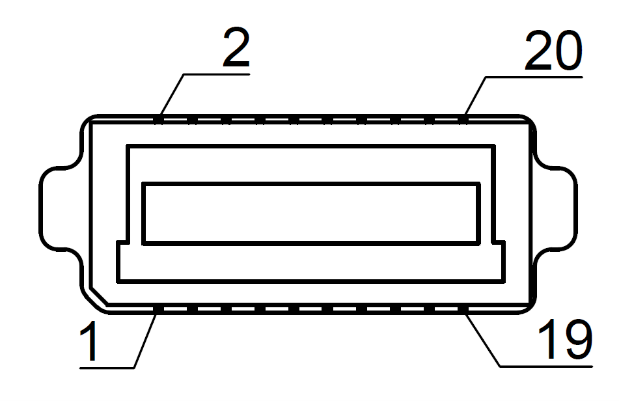 |
|||
| N | Name | N | Name | |
| 1 | Vin | 2 | Gnd | |
| 3 | Vin | 4 | Gnd | |
| 5 | Vin | 6 | Gnd | |
| 7 | nc | 8 | nc | |
| 9 | Trigger Output | 10 | TimeMark | |
| 11 | UART TX | 12 | UART RX | |
| 13 | nc | 14 | nc | |
| 15 | nc | 16 | nc | |
| 17 | LAN TX+ | 18 | LAN RX+ | |
| 19 | LAN TX- | 20 | LAN RX- | |
Compatible lenses
TOPODRONE P24 supports lenses with Sony E mount. When operating the TOPODRONE P24 on an aircraft-type UAV, it is recommended to use a lens with a fixed focal length and a manual focus adjustment wheel set to infinity.
It comes with a Sony SEL16F28 lens or COLOR-SKOPAR 21mm F/3.5 lens, its specifications are shown in the table below.
Sony SEL16F28 lens
| Bayonet | Sony E | 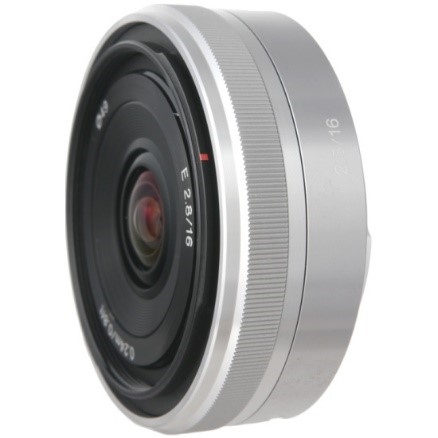 |
| Focal length, mm | 16 Stock | |
| Equivalent focal length for 35 mm, mm | 24 | |
| Angle of view (APS-C), ° | 72 | |
| Minimum aperture value | 2,8 | |
| Maximum aperture value | 22 | |
| Minimum focusing distance, m | 0,24 | |
| Size (diameter × length), mm | 62 × 22,5 | |
| Weight, g | 67 |
COLOR-SKOPAR 21mm F/3.5 lens
| Bayonet | Sony E | 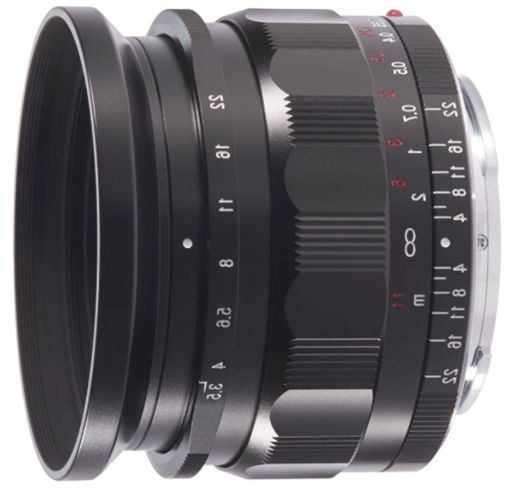 |
| Focal length, mm | 21 Stock | |
| Equivalent focal length for 35 mm, mm | 31.май | |
| Angle of view (APS-C), ° | 58 | |
| Minimum aperture value | 03.май | |
| Maximum aperture value | 22 | |
| Minimum focusing distance, m | 0,24 | |
| Size (diameter × length), mm | 62 × 22,5 | |
| Weight with a blend, g | 243 | |
| Weight w/o a blend, g | 232 |
COLOR-SKOPAR 21mm F/3.5 lens
TOPODRONE P24 Specification
| Camera type | Mirrorless with interchangeable optics |
| Bayonet type | Sony E |
| Image stabilisation | Absent |
| Number of megapixels | 24 |
| Matrix size | APS-C (23.5 x 15.6 mm) |
| Maximum photo size, pixels | 6000 x 4000 |
| Matrix type | CMOS |
| Cropping factor | 1,5 |
| Shooting Modes | Shutter speed priority, Aperture Priority (optional), Manual, Auto |
| Exposure steps | +/-5 EV in 1/3 step increments |
| ISO range | 100-32000 |
| Shutter speed range, s | 30.01.4000 |
| Supported memory card formats | microSD, microSDHC, microSDXC |
| Maximum supported memory capacity, Gb | 256 |
| Supported file system type | FAT32 |
| Built-in battery | Absent |
| Weight w/o 3-axis gimbal and w/o lens, g | 220 |
| Weight w/o 3-axis gimbal with SEL16F28 lens, g | 295 |
| Weight with 3-axis gimbal and SEL16F28 lens, g | 750 |
| Video capture capability | Absent |
| Operating temperature range, °C | -20 ... +40 |
| Gimbal tilt angle range, ° | -130 ... +140 |
| Gimbal rotation angle range, ° | ±320 |
TOPODRONE UAV PPK Upgrade Kit Specifications
TOPODRONE UAV PPK Upgrade Kit is a small GNSS receiver with the ability to connect an external GNSS antenna and integrate with various payloads.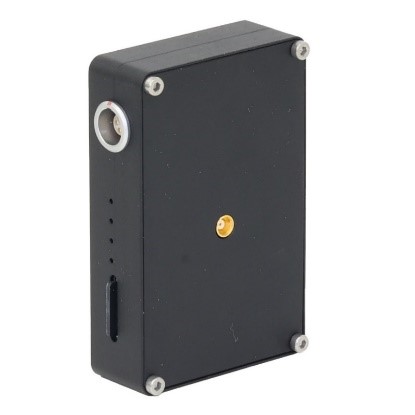 TOPODRONE PPK UAV KIT Specifications
| Supported GNSS systems and frequencies | GPS: L1C/A, L2C; GLONASS: L1OF, L2OF; GALILEO: E1B/C, E5b; BEIDOU: B1I, B2I |
| Raw measurement recording frequency, Hz | 10 |
| Number of GNSS receiver channels, pcs. | 184 |
| Supported memory card formats | microSD, microSDHC, microSDXC |
| Maximum supported memory capacity, GB | 16 |
| Supported file system type | FAT32 |
| Minimum number of satellites to initialization, pcs. | 8 |
LED indicators descriprion
| LED | Description |
| Green LED | Indicates the status of the Power Pack |
| Blue LED |
PDOP>10 not lit Flashing slowly 3<PDOP<10 |
| Orange LED | Indicates the status of recording to the memory card. The LED blinks rapidly during recording. Each flashing corresponds to the recording of 4 kB of data |
| Red LED | Indicates if there are any errors in the system. If an error occurs, check the memory card |
Wi-Fi connection and setting adjusting
To connect to the TOPODRONE P24 via the web interface, the following is required:
1. TOPODRONE P24 itself with external power supply connected (VIA SHLD port or USB Type-C 2 port)
2. Any mobile device with Wi-Fi module and web browser (mobile phone, tablet, laptop, etc.).
To connect to the TOPODRONE P24 via the web interface, do the following steps:
| 1. | Enable power on the TOPODRONE P24 and wait for 30 seconds, while camera is initializing | 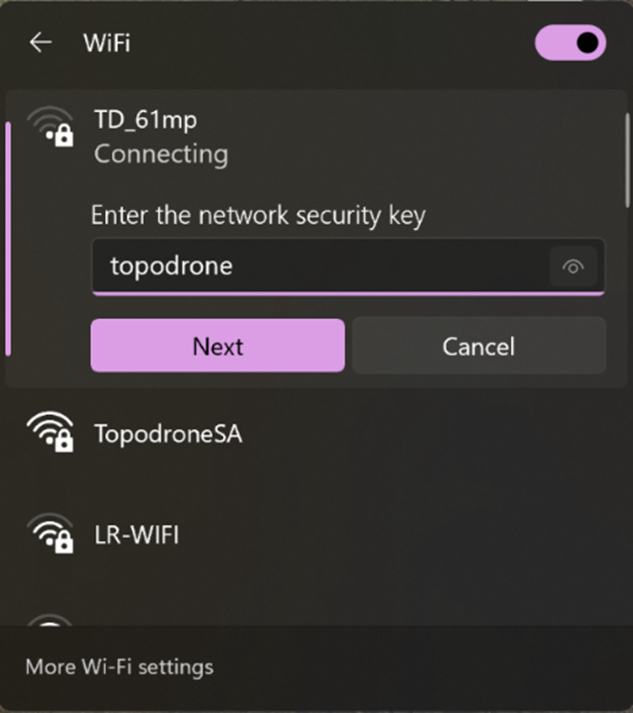 |
| 2. | Take your mobile device and stay somewhere not more than 10 meters around TOPODRONE P24 | |
| 3. | Open Wi-Fi settings and connect to SSID: TD_61mp, password: topodrone | |
| 4. | After connection to TOPODRONE P24’s Wi-Fi open web-browser on your mobile device and go to http://192.168.10.1/ | |
| 5. | You will see the camera settings interface, divided to 3 tabs: Main, Settings, HW. |
MAIN |
SETTINGS |
HW |
Main Tab
This tab displays the current camera settings and video stream.
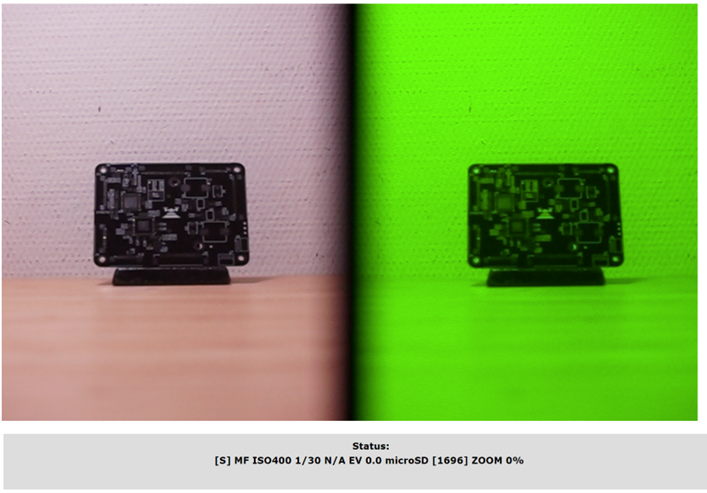
|
[S] |
MF |
ISO400 |
1/30 |
N/A |
0.0 |
microSD[1696] |
ZOOM 0% |
|
Operating mode
Available values: [S] Shutter priority [M] Manual [A] Aperture priority [iA] Intellectual Auto [P] Program Auto |
Focus mode
Available values: AF - center point autofocus MF - manual focus
|
light sensitivity
Available values: 50..51200, Auto
|
Shutter speed
Available values: 1/4000..30’
|
F aperture value
Available values: 2.8..22 (depending on the lens) (n/a = not avalible on this lens)
|
Exposure correction
Available values: -5.0..+5.0 in 0.3 increments.
|
Number of photos remain
Available values: depends on the memory card and the selected photo quality.
|
Optical zoom value
Available values: 0-100, magnification depends on the lens
|
Settings Tab
This tab allows you to change camera settings, described on previous step
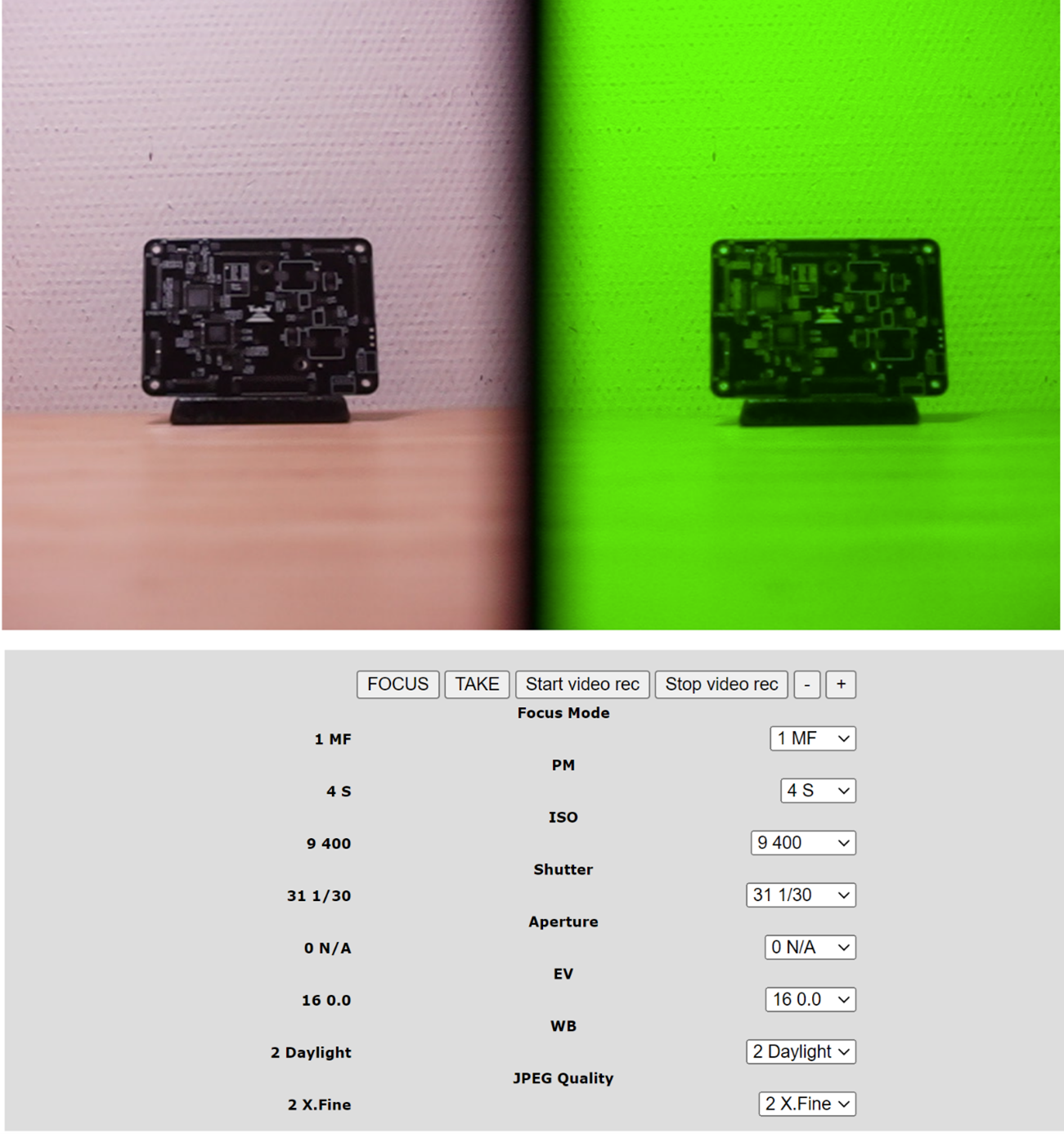
Also, the following settings are also available on the settings page:
WB - White Balance (White Balance Scenario)
Available values: Auto/Daylight/Shade/Cloudy
JPEG Quality - JPEG quality
Available values: STD/Fine/X.Fine/RAW.
[FOCUS] – camera will make focusing if pressed. Available in AF mode only.
[TAKE] – shutter button, camera will take a picture if pressed
[Start video rec] – camera will start video recording if pressed
[Stop video rec] – camera will stop video recording if pressed
[-] [+] – zoom control buttons if the lens has a zoom control
TOPODRONE P24 requires forced cooling when recording video. Avoid overheating the camera.
The current values of the camera parameters are displayed in the left column.
Tab HW
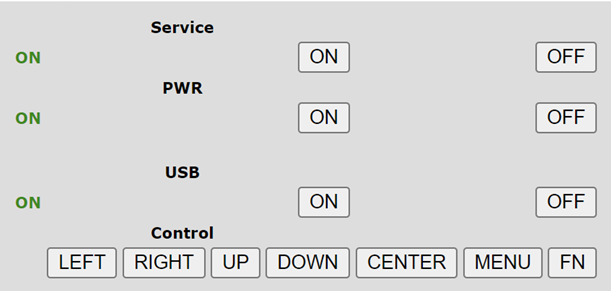
On the HW tab, use the buttons to navigate through the TOPODRONE P24 menu. This requires an HDMI connection to an external monitor. Use HW tab only for specific custom settings.
Tab HW
On the HW tab, use the buttons to navigate through the TOPODRONE P24 menu. This requires an HDMI connection to an external monitor. Use HW tab only for specific custom settings.
Image Settings for TOPODRONE P24
For more information on adjusting your image settings, check out our Telegram channel at the links below:
Best Camera Settings. Introduction. Part 1 of 3.
Best Camera Settings. Semi-automatic and manual shooting modes. Part 2 of 3.
Best Camera Settings. Tips & Tricks. Part 3 of 3.
Connecting the camera to the Internet
To output TOPODRONE P24 to the Internet, the following components and conditions will be required:
- Mobile device (smartphone or tablet) running Android OS (only Samsung, Honor, Xiaomi phones are tested, mobile devices from other manufacturers may not work correctly).
- 3G/4G/5G mobile internet or Wi-Fi network with internet connection
- USB Type-C to Type-C cable for connection to mobile device (supplied with smartphone/tablet)
- TOPODRONE P24
- Install TOPODRONE P24 according to the delivery set
- Power up TOPODRONE P24 by connecting it to the drone via SHLD port, powerbank or power supply.
- Wait for the camera to turn on and boot up.
- Connect the USB Type-C cable to a mobile device (smartphone or tablet) running Android and the USB Type-C 1 port on the TOPODORNE P24.
- Make sure that the mobile device has an active internet connection via 3G/4G/5G or Wi-Fi.
- On (1) mobile device, go to menu: settings / connections / mobile hotspot and modem / USB modem mode.
- TOPODRONE P24 is displayed on the Internet.