# Settings Tab

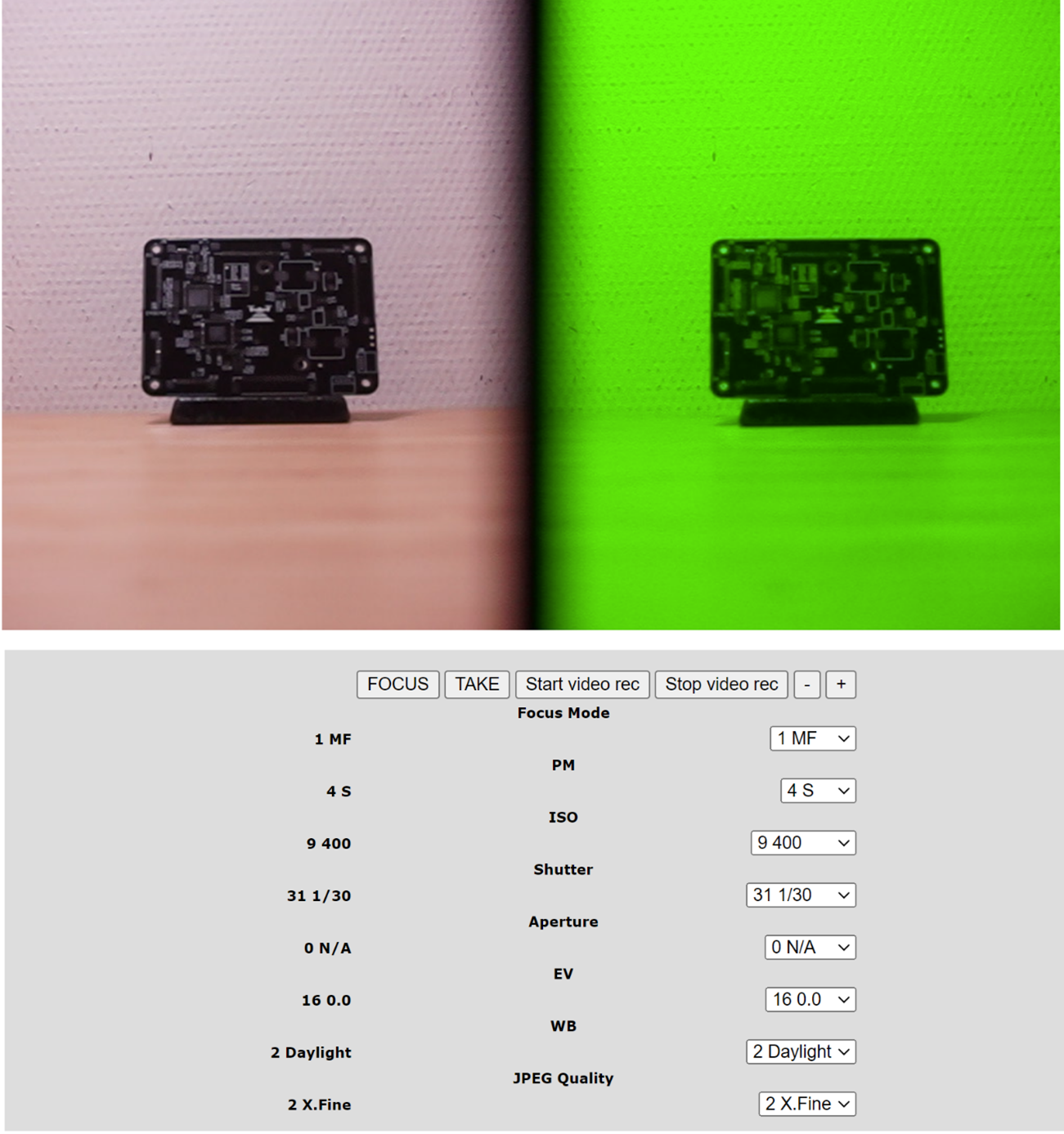
##### <span lang="EN-US" style="font-family: 'Times New Roman',serif; mso-ansi-language: EN-US;"> This tab allows you to change camera settings, described on previous step</span>

##### <span lang="EN-US" style="font-family: 'Times New Roman',serif; mso-ansi-language: EN-US;">[![7.png](https://knowledge.topodrone.com/uploads/images/gallery/2024-10/scaled-1680-/7.png)](https://knowledge.topodrone.com/uploads/images/gallery/2024-10/7.png)</span>

##### <span lang="EN-US" style="font-size: 12.0pt; line-height: 107%; font-family: 'Times New Roman',serif; mso-ansi-language: EN-US;">Also, the following settings are also available on the settings page:</span>

##### **<span lang="EN-US" style="font-size: 12.0pt; line-height: 115%; font-family: 'Times New Roman',serif; mso-ansi-language: EN-US;">WB</span>**<span lang="EN-US" style="font-size: 12.0pt; line-height: 115%; font-family: 'Times New Roman',serif; mso-ansi-language: EN-US;"> - White Balance (White Balance Scenario)</span>

##### <span lang="EN-US" style="font-size: 12.0pt; line-height: 115%; font-family: 'Times New Roman',serif; mso-ansi-language: EN-US;">Available values: Auto/Daylight/Shade/Cloudy</span>

##### **<span lang="EN-US" style="font-size: 12.0pt; line-height: 115%; font-family: 'Times New Roman',serif; mso-ansi-language: EN-US;">JPEG Quality</span>**<span lang="EN-US" style="font-size: 12.0pt; line-height: 115%; font-family: 'Times New Roman',serif; mso-ansi-language: EN-US;"> - JPEG quality</span>

##### <span lang="EN-US" style="font-size: 12.0pt; line-height: 115%; font-family: 'Times New Roman',serif; mso-ansi-language: EN-US;">Available values: STD/Fine/X.Fine/RAW.</span>

##### **<span lang="EN-US" style="font-size: 12.0pt; line-height: 107%; font-family: 'Times New Roman',serif; mso-ansi-language: EN-US;">\[FOCUS\]</span>**<span lang="EN-US" style="font-size: 12.0pt; line-height: 107%; font-family: 'Times New Roman',serif; mso-ansi-language: EN-US;"> – camera will make focusing if pressed. Available in AF mode only.</span>

##### **<span lang="EN-US" style="font-size: 12.0pt; line-height: 107%; font-family: 'Times New Roman',serif; mso-ansi-language: EN-US;">\[TAKE\]</span>**<span lang="EN-US" style="font-size: 12.0pt; line-height: 107%; font-family: 'Times New Roman',serif; mso-ansi-language: EN-US;"> – shutter button, camera will take a picture if pressed</span>

##### **<span lang="EN-US" style="font-size: 12.0pt; line-height: 107%; font-family: 'Times New Roman',serif; mso-ansi-language: EN-US;">\[Start video rec\]</span>**<span lang="EN-US" style="font-size: 12.0pt; line-height: 107%; font-family: 'Times New Roman',serif; mso-ansi-language: EN-US;"> – camera will start video recording if pressed</span>

##### **<span lang="EN-US" style="font-size: 12.0pt; line-height: 107%; font-family: 'Times New Roman',serif; mso-ansi-language: EN-US;">\[Stop video rec\]</span>**<span lang="EN-US" style="font-size: 12.0pt; line-height: 107%; font-family: 'Times New Roman',serif; mso-ansi-language: EN-US;"> – camera will stop video recording if pressed</span>

##### **<span lang="EN-US" style="font-size: 12.0pt; line-height: 107%; font-family: 'Times New Roman',serif; mso-ansi-language: EN-US;">\[-\] \[+\]</span>**<span lang="EN-US" style="font-size: 12.0pt; line-height: 107%; font-family: 'Times New Roman',serif; mso-ansi-language: EN-US;"> – zoom control buttons if the lens has a zoom control</span>

##### <span lang="EN-US" style="font-family: 'Times New Roman',serif; mso-ansi-language: EN-US;">TOPODRONE P24 requires forced cooling when recording video. Avoid overheating the camera.</span>

##### <span lang="EN-US" style="font-family: 'Times New Roman',serif; mso-ansi-language: EN-US;"><span lang="EN-US" style="font-size: 11.0pt; line-height: 107%; font-family: 'Times New Roman',serif; mso-fareast-font-family: Calibri; mso-fareast-theme-font: minor-latin; mso-ansi-language: EN-US; mso-fareast-language: EN-US; mso-bidi-language: AR-SA;">The current values of the camera parameters are displayed in the left column.</span></span>

##### **<span lang="EN-US" style="font-size: 14.0pt; line-height: 107%; font-family: 'Times New Roman',serif; mso-fareast-font-family: 'Calibri Light'; color: #00b050; mso-ansi-language: EN-US;">Tab HW</span>**

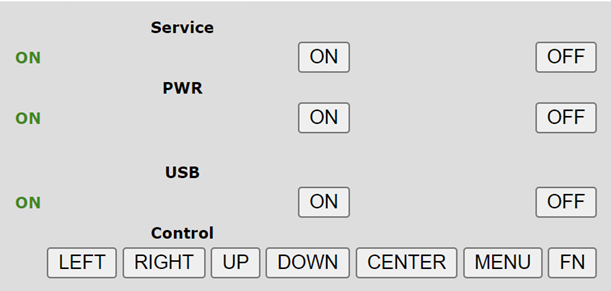
##### <span lang="EN-US" style="font-family: 'Times New Roman',serif; mso-ansi-language: EN-US;">On the HW tab, use the buttons to navigate through the TOPODRONE P24 menu. This requires an HDMI connection to an external monitor. Use HW tab only for specific custom settings.</span>

<span lang="EN-US" style="font-family: 'Times New Roman',serif; mso-ansi-language: EN-US;">[![8.png](https://knowledge.topodrone.com/uploads/images/gallery/2024-10/scaled-1680-/8.png)](https://knowledge.topodrone.com/uploads/images/gallery/2024-10/8.png)</span>