# Сustomization the camera profile for route building

##### <span style="color: rgb(45, 194, 107);">**Сustomization the TOPODRONE 61 profile with the AGROWING multispectral lens in the UgCS software**</span>

UgCS is software designed to manage drones and perform various tasks in mapping, monitoring, agriculture, infrastructure inspection and other applications. UgCS offers an intuitive interface and allows you to efficiently plan and manage drone flights, as well as process the acquired data.

For correct flight planning in UgCS it is necessary to customize drone profile parameters and payload parameters.

Click "Menu" / "Main Menu" / "Profiles" / "Drone Model Name" / "Edit Object".

[![1.png](https://knowledge.topodrone.com/uploads/images/gallery/2025-02/scaled-1680-/1.png)](https://knowledge.topodrone.com/uploads/images/gallery/2025-02/1.png)

[![11.jpg](https://knowledge.topodrone.com/uploads/images/gallery/2025-02/scaled-1680-/11.jpg)](https://knowledge.topodrone.com/uploads/images/gallery/2025-02/11.jpg)

In the "Route restrictions" section, change the highlighted parameters to the values shown in the figure.

[![222.jpg](https://knowledge.topodrone.com/uploads/images/gallery/2025-02/scaled-1680-/222.jpg)](https://knowledge.topodrone.com/uploads/images/gallery/2025-02/222.jpg)

Then go to the “Loads” tab to customize the camera profile.

![33.jpg](https://knowledge.topodrone.com/uploads/images/gallery/2025-02/Atx33.jpg)

And import the required profile. (Profiles can be downloaded from the links below)

**[TOPODRONE P61+AGROWING Quad.profile](https://knowledge.topodrone.com/attachments/10)**

**[TOPODRONE P61+AGROWING Sextuple.profile](https://knowledge.topodrone.com/attachments/11)**

---

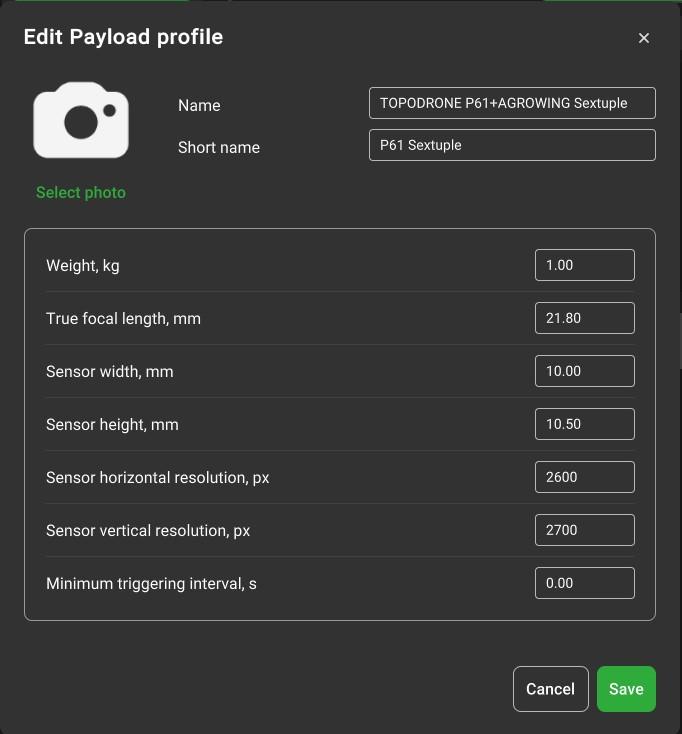
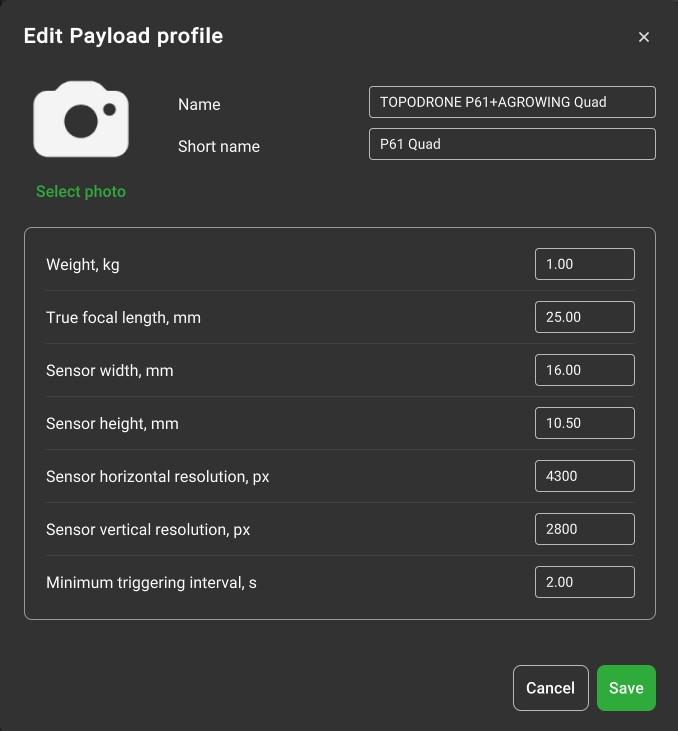
<span class="EzKURWReUAB5oZgtQNkl" data-src-align="0:3">If</span> <span class="EzKURWReUAB5oZgtQNkl" data-src-align="4:13">necessary</span>, <span class="EzKURWReUAB5oZgtQNkl" data-src-align="18:3">all</span> <span class="EzKURWReUAB5oZgtQNkl" data-src-align="32:6">camera</span> <span class="EzKURWReUAB5oZgtQNkl" data-src-align="22:9">parameters</span> <span class="EzKURWReUAB5oZgtQNkl" data-src-align="39:5">can</span> be <span class="EzKURWReUAB5oZgtQNkl" data-src-align="45:6">entered</span> <span class="EzKURWReUAB5oZgtQNkl" data-src-align="52:7">manually</span>. <span class="EzKURWReUAB5oZgtQNkl" data-src-align="61:3">To</span> do <span class="EzKURWReUAB5oZgtQNkl" data-src-align="65:5">this</span>, <span class="EzKURWReUAB5oZgtQNkl" data-src-align="71:14">click</span> <span class="EzKURWReUAB5oZgtQNkl" data-src-align="86:7">create</span> <span class="EzKURWReUAB5oZgtQNkl" data-src-align="94:1">and</span> <span class="EzKURWReUAB5oZgtQNkl" data-src-align="115:7">enter</span> the <span class="EzKURWReUAB5oZgtQNkl" data-src-align="123:11">required</span> <span class="EzKURWReUAB5oZgtQNkl" data-src-align="135:8">values</span> <span class="EzKURWReUAB5oZgtQNkl" data-src-align="96:1">in</span> the <span class="EzKURWReUAB5oZgtQNkl" data-src-align="110:4">window</span> that <span class="EzKURWReUAB5oZgtQNkl" data-src-align="98:11">opens</span><span class="EzKURWReUAB5oZgtQNkl" data-src-align="143:1">.</span>

<table border="1" id="bkmrk--5" style="width: 100%;"><colgroup><col style="width: 50.0596%;"></col><col style="width: 49.9404%;"></col></colgroup><tbody><tr><td>##### [![44.jpg](https://knowledge.topodrone.com/uploads/images/gallery/2025-02/scaled-1680-/44.jpg)](https://knowledge.topodrone.com/uploads/images/gallery/2025-02/44.jpg)

</td><td>[##### ![55.jpg](https://knowledge.topodrone.com/uploads/images/gallery/2025-02/scaled-1680-/55.jpg)](https://knowledge.topodrone.ru/uploads/images/gallery/2025-01/profil-nagruzki-ugcs-topodrone-p61agrowing-sextuple.jpg)</td></tr></tbody></table>

##### <span style="color: rgb(45, 194, 107);">**Сustomization TOPODRONE 61 profile with AGROWING multispectral lens in DJI Pilot 2 software**</span>

Turn on the Smart Controller and open DJI Pilot 2.

[![Screenshot_20250207-155850.png](https://knowledge.topodrone.com/uploads/images/gallery/2025-02/scaled-1680-/screenshot-20250207-155850.png)](https://knowledge.topodrone.com/uploads/images/gallery/2025-02/screenshot-20250207-155850.png)

Select the Flight Route tab and create a new route for mapping.[![Screenshot_20250207-160758.png](https://knowledge.topodrone.com/uploads/images/gallery/2025-02/scaled-1680-/screenshot-20250207-160758.png)](https://knowledge.topodrone.com/uploads/images/gallery/2025-02/screenshot-20250207-160758.png)

<span class="EzKURWReUAB5oZgtQNkl" data-src-align="0:5">Tap to the map to created a mapping area. Next</span>, <span class="EzKURWReUAB5oZgtQNkl" data-src-align="6:14">click</span> the <span class="EzKURWReUAB5oZgtQNkl" data-src-align="21:1">"</span><span class="EzKURWReUAB5oZgtQNkl" data-src-align="22:7">Select</span> <span class="EzKURWReUAB5oZgtQNkl" data-src-align="30:6:41:6">Camera</span><span class="EzKURWReUAB5oZgtQNkl" data-src-align="36:1">"</span> <span class="EzKURWReUAB5oZgtQNkl" data-src-align="38:1">/</span> <span class="EzKURWReUAB5oZgtQNkl" data-src-align="40:1">"Custom</span> camera<span class="EzKURWReUAB5oZgtQNkl" data-src-align="72:1">"</span> button <span class="EzKURWReUAB5oZgtQNkl" data-src-align="74:1">and</span> <span class="EzKURWReUAB5oZgtQNkl" data-src-align="76:8">add</span> a <span class="EzKURWReUAB5oZgtQNkl" data-src-align="85:5">new</span> <span class="EzKURWReUAB5oZgtQNkl" data-src-align="91:6">camera</span><span class="EzKURWReUAB5oZgtQNkl" data-src-align="97:1">.[![Screenshot_20250207-161530.png](https://knowledge.topodrone.com/uploads/images/gallery/2025-02/scaled-1680-/screenshot-20250207-161530.png)](https://knowledge.topodrone.com/uploads/images/gallery/2025-02/screenshot-20250207-161530.png)</span>

Enter the camera name, photo size, sensor size, focal length, minimum photo interval, and click the “Done” button[![Screenshot_20250207-161832.png](https://knowledge.topodrone.com/uploads/images/gallery/2025-02/scaled-1680-/screenshot-20250207-161832.png)](https://knowledge.topodrone.com/uploads/images/gallery/2025-02/screenshot-20250207-161832.png)

[![Screenshot_20250207-162218.png](https://knowledge.topodrone.com/uploads/images/gallery/2025-02/scaled-1680-/screenshot-20250207-162218.png)](https://knowledge.topodrone.com/uploads/images/gallery/2025-02/screenshot-20250207-162218.png)

Now you can move on to mission planning.