# PRJ editor

PRJ Editor is a tool that allows you to edit the coordinate system knowing the transition parameters. In order to use it you need to select "PRJ Editor" in the Tools panel.

[![image.png](https://knowledge.topodrone.com/uploads/images/gallery/2024-10/scaled-1680-/YADimage.png)](https://knowledge.topodrone.com/uploads/images/gallery/2024-10/YADimage.png)

<p class="callout warning">Currently, a small amount of photogrammetry and laser scanning software supports affine transformations, so this tool does not support affine transformations in the same way.</p>

In the window that opens, click the "Select" button and select the \*.prj file you want to edit.

[![image.png](https://knowledge.topodrone.com/uploads/images/gallery/2024-10/scaled-1680-/PE2image.png)](https://knowledge.topodrone.com/uploads/images/gallery/2024-10/PE2image.png)
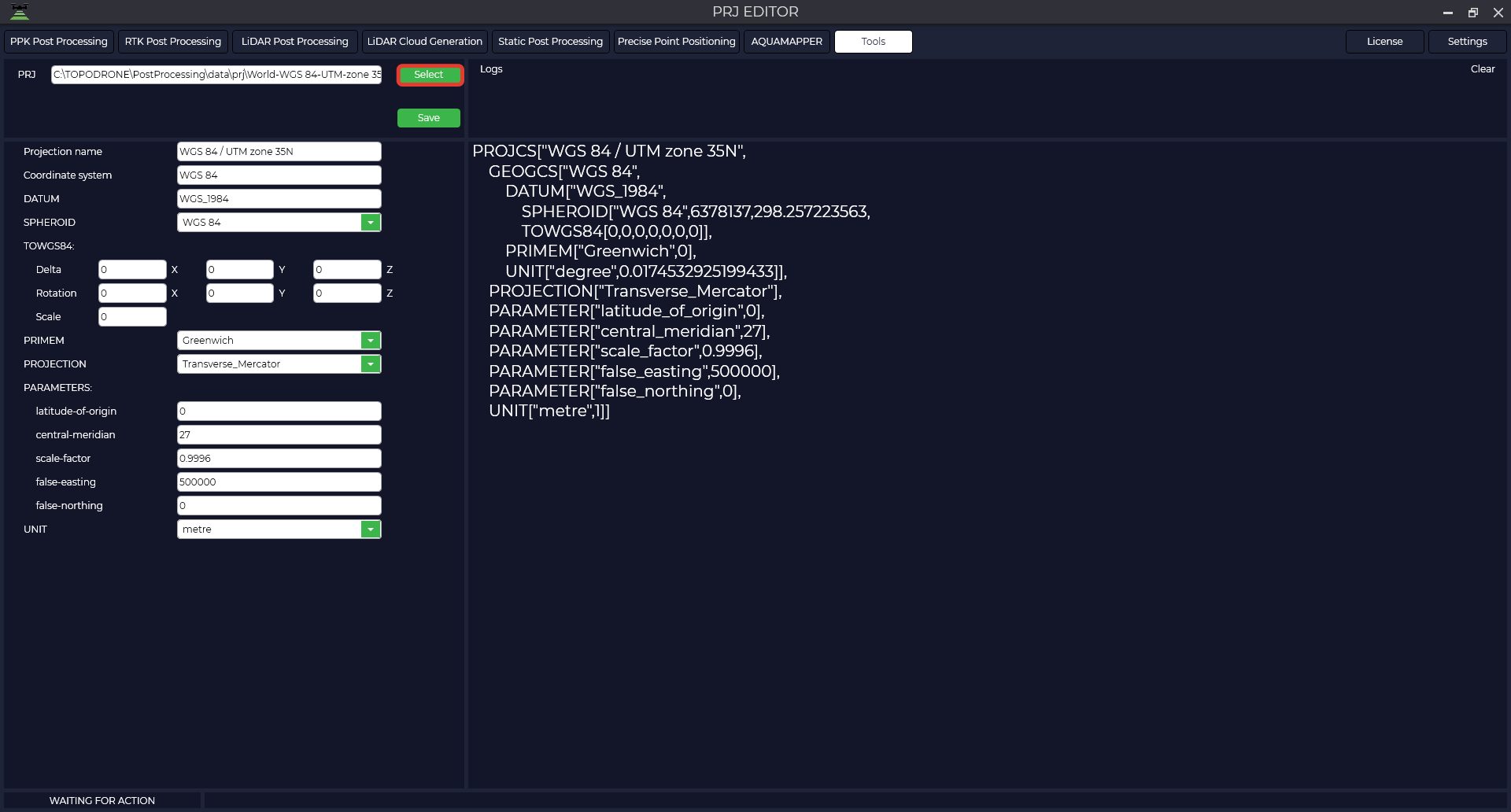
The table provides a description of the parameters

<table border="1" id="bkmrk-projection-name-russ" style="border-collapse: collapse;"><colgroup><col style="width: 15%;"></col><col style="width: 20%;"></col><col style="width: 33.3333%;"></col></colgroup><tbody><tr><td>Projection name  
</td><td>WGS 84 / UTM zone 35N</td><td>Projection name</td></tr><tr><td>Coordinate system</td><td>WGS\_1984</td><td>Name of coordinate system</td></tr><tr><td>DATUM</td><td>WGS\_1984</td><td>Datum name</td></tr><tr><td>SPHEROID</td><td>WGS 84",6378137,298.257223563</td><td>Name of ellipsoid</td></tr><tr><td>TOWGS84</td><td>  
</td><td>7 parameters of transition to WGS84</td></tr><tr><td>Delta</td><td>0,0,0</td><td style="text-align: justify;">Displacement of the intermediate geocentric coordinate along the X, Y, Z axes. It is specified in meters, and the translation direction is indicated by the value sign.</td></tr><tr><td>Rotation</td><td>0,0,0</td><td style="text-align: justify;">The amount of rotation about the X, Y, Z axes that applies to intermediate geocentric coordinates. It is specified in angular seconds, and the direction of translation is indicated by the sign of the value.</td></tr><tr><td>Scale</td><td>0</td><td style="text-align: justify;">A scaling factor that applies to intermediate geocentric coordinates. The value is given in parts per million and is the difference between the actual scaling factor and one.  
For example, a scale parameter value of -2.5 gives an actual scale factor of 0.9999985. That is, the actual scale factor used is obtained by multiplying the parameter value by 1.0x10-06 and adding the result (algebraically) to 1.0.  
</td></tr><tr><td>PRIMEM</td><td>"Greenwich",0</td><td style="text-align: justify;">Zero meridian, indicating the offset between the zero meridian of the declared coordinate system and the Greenwich coordinate system.</td></tr><tr><td>UNIT</td><td>"degree",0.01745329251994328</td><td>The unit of measure of SC (degrees).</td></tr><tr><td>PROJECTION</td><td>Transverse\_Mercator</td><td>Projection type</td></tr><tr><td>PARAMETERS</td><td>  
</td><td>  
</td></tr><tr><td>Latitude of origin</td><td>0</td><td>Initial latitude</td></tr><tr><td>Central meridian</td><td>27</td><td>Central meridian</td></tr><tr><td>Scale factory</td><td>0.9996</td><td>Scale factor</td></tr><tr><td>False easting</td><td>500000</td><td>Shift east</td></tr><tr><td>False northing</td><td>0</td><td>Shift north</td></tr><tr><td>UNIT</td><td>metre

</td><td>Projection unit</td></tr></tbody></table>

Make all necessary changes to the parameters, click the "Save" button, specify the path to save and the file name.

[![image.png](https://knowledge.topodrone.com/uploads/images/gallery/2024-10/scaled-1680-/fefimage.png)](https://knowledge.topodrone.com/uploads/images/gallery/2024-10/fefimage.png)

The resulting file is shown below.

```python
PROJCS["WGS 84 / UTM zone 35N",
    GEOGCS["WGS 84",
        DATUM["WGS_1984",
            SPHEROID["WGS 84",6378137,298.257223563,
            TOWGS84[0,0,0,0,0,0,0]],
        PRIMEM["Greenwich",0,
        UNIT["degree",0.0174532925199433,
    PROJECTION["Transverse_Mercator"],
    PARAMETER["latitude_of_origin",0],
    PARAMETER["central_meridian",27],
    PARAMETER["scale_factor",0.9996],
    PARAMETER["false_easting",500000],
    PARAMETER["false_northing",0],
    UNIT["metre",1]]
```